
How To Research and Find Local SEO Keywords
Whether you’re a business owner, or working as an agency, assistant, or a freelancer—local SEO keyword research starts with knowing the business, location, and the service being offered.
This may sound easy, but there are so many potential slang terms, secondary services, or alternative and unknown verbiage that you may be unaware of.
Similarly, some cities and areas have their own location terminology as well that you will not find on the map. For instance, in New Jersey, there are many locals who use “North Jersey” or “South Jersey” to describe locations.
These can be easily missed, and reduce your traffic potential—meaning a loss of revenue from real customers.
That means, effective local SEO keyword research must start with a thorough list of services and cities/locations.
Step #1 – Make a list of potential services
Let’s start with services.
Go through your competitors on the local and national level, and take screenshots of any and all services they have listed on their website or GBP.
I like to find the ones with these overpopulated lists of services and pages. That way, you’re likely finding the businesses that have already done this research.
With enough of these lists, you’re unlikely to miss anything.
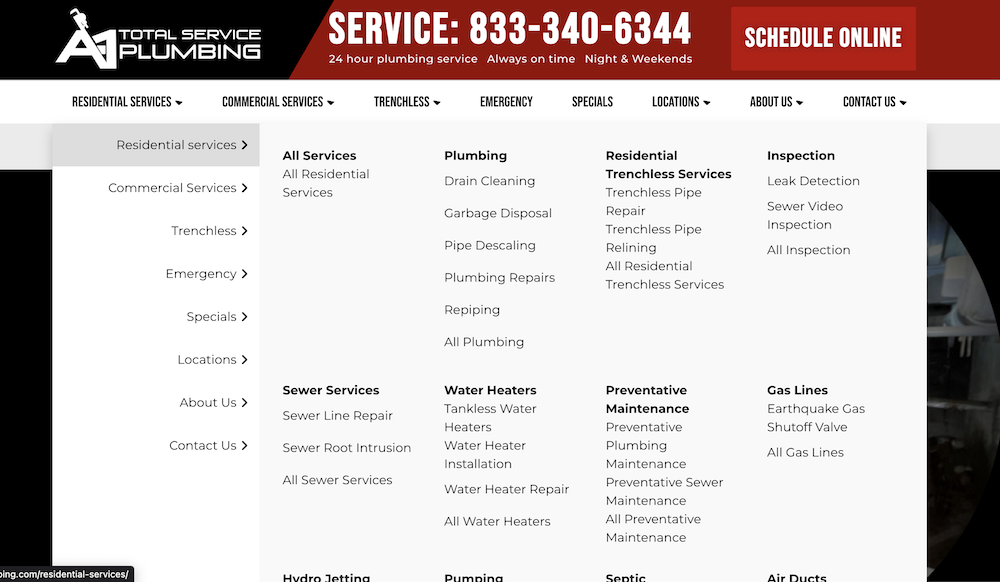
Once you have 4-6 of these website lists, you can paste your screenshots into ChatGPT, or another AI tool, and ask it to compile a list with no duplicates.
Then, ask your favorite AI tool to tell you if there is anything you might be missing. You’ll find that it does a pretty good job at finding holes and potential missing items.
Also, ask your AI tool if there are any slang or other terms potential customers might be using that you do not have. This is important.
Now you have a pretty strong list of potential services to offer.
Step #2 — Make a list of cities and locations
Next, you’re going to make a list of nearby cities and locations.
I say locations because you don’t want to miss any terms customers might be using in the local area (as discussed previously with terms like “South Jersey”).
Take a screenshot of the area on Google Maps. Then, use ChatGPT to get a list of cities in that area, as well as special location terms, and have them placed on a list ordered from highest to lowest population.
Now you have a very over-prepared list of services, and a list of cities and locations, which is perfect for your next local SEO keyword research step.
Step #3 – Find keywords related to your primary city
The list you have is powerful, but now your services and the city locations need to be matched up to find actual searches customers make in the local area.
If you’re in a big city, this can be exponential. For instance, an HVAC company in Denver may have 30+ unique keywords customers are searching for.
Then, add the potential that this HVAC company also services 10 slightly smaller city locations around Denver, and you get an idea of the potential.
This is why, typically, I prefer to do one city at a time—whatever works for you though!
Finding Search Keywords
What you want to do is use a tool like AHREFs to go through and find the services being searched in each city area.
You can start two ways—either with the largest population area, or with the exact city the business is located in. Either way, you’ll be targeting all of these keywords in the long run.
Put in each service term, and all of the different variations of the term. For instance, instead of plumber, you’ll enter “plumber, plumbing, plumbers”—thus covering all the potential variations that a customer may type in.
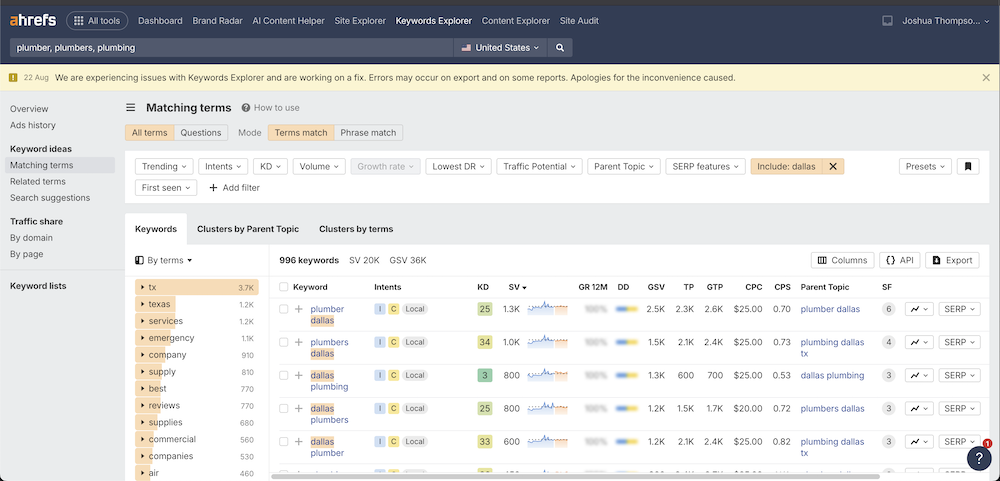
Then, on the left side menu, click on “Matching terms” to get all of the potential searches that include these plumbing related keywords.
After that, you’ll use the “include” option in the sub-menu (as shown above) to narrow your terms to only those with the city or location term you are exploring.
In this case, “dallas” is entered, and now we only see plumbing related keywords and variations that include “dallas” in the search term.
Grouping Terms Together
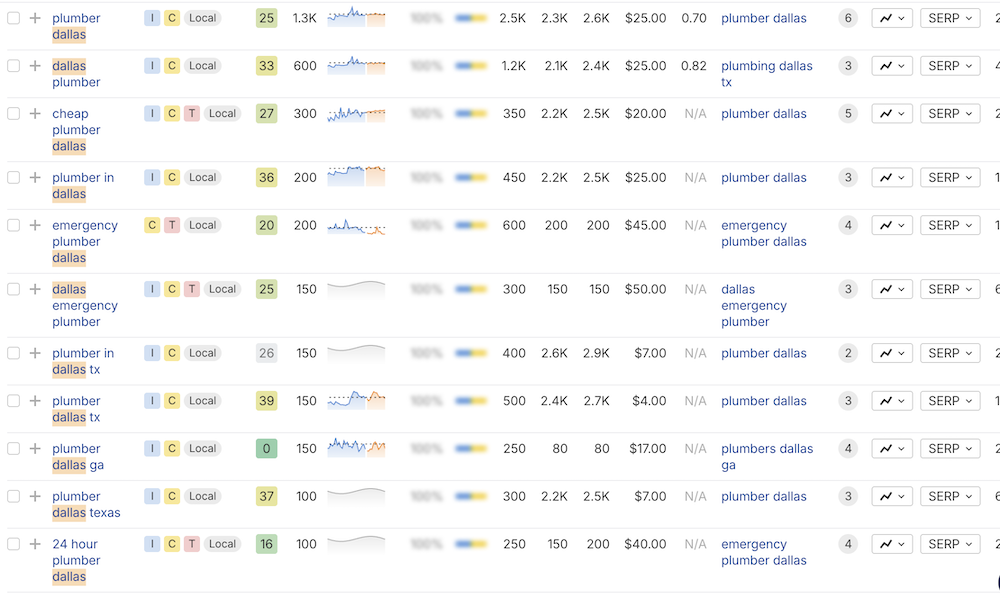
Personally, I follow this rule: “1 Service + 1 City = 1 Page”.
That means, I copy the term “plumber dallas” and plan to use that as the primary keyword for a page on the website.
Since “plumbing company” “plumbing services” “cheap plumber” are all very similar terms, and not unique services, I would skip those or place them as secondary keywords under the primary term “plumber dallas”.
However, “plumbing repair dallas” is definitely a unique service, and deserves its own specific webpage.
“Emergency plumber”—that’s separate as well.
“Commercial plumbing” too.
You can now go through all of the terms, and locate those you find best represent unique services offered by your business, and we’ll use this later to create city-service landing pages that rank.
Step #4 — Expand your list with secondary cities and areas
Now, you can go through every city/location with this same method, and find the potential keywords being searched in those areas.
Smaller areas will likely have less volume, so not as many searches will show up. This is completely fine. For right now, you simply want to make a record of the searches with volume, and make a note.
But, the end results is to have a primary target search for every unique service and city location that your business directly services.
Wrapping Up Local SEO Keyword Research
With that, you now have a complete list of keywords to use to maximize your local SEO campaigns. This contains every possible search term your customers are using—valuable data you can use to create content, pages, or use to optimize your Google Business Profile.
This list is important because it helps you reverse engineer and capture traffic based on the actions your customers are taking on a daily basis. Instead of guessing, or creating pages for no reason, now you have the best possible information to bring traffic, leads, and revenue directly to your front door—a strategy we are big on at Brightbeam SEO.
With that, let’s move on to the next step in our local SEO guide:
Creating an organized website plan using the silo structure.