
Understanding Silo Structure for SEO
“Siloing” is a common website organization strategy used in SEO. It involves “grouping” pages together by common themes, making it easier to accomplish your SEO goals.
The term comes from farming silos—like the above. As you can see from the above, each of these silos can be used for different crops—one for corn, one for beans, etc.
Thus, everything is separated out neatly by a type or category.
For a website, this is no different. Pages are separated into silos that work together to target specific searches made by potential customers.
For example: A company that offers HVAC services will likely have a silo for air conditioning services, one for heating services, and another for general HVAC services—since each of these silos will likely contain their own, more specific keywords for installation, repair, maintenance, etc.
Silo Structure for Local SEO
For local SEO, services are only part of the structure—with city/location being the other variable.
Looking at an example for a plumbing business doing SEO, you’ll likely have plumbing services divide up by their type or category, but also with the city variable at the highest level.
This is best way to use a silo structure for local SEO.
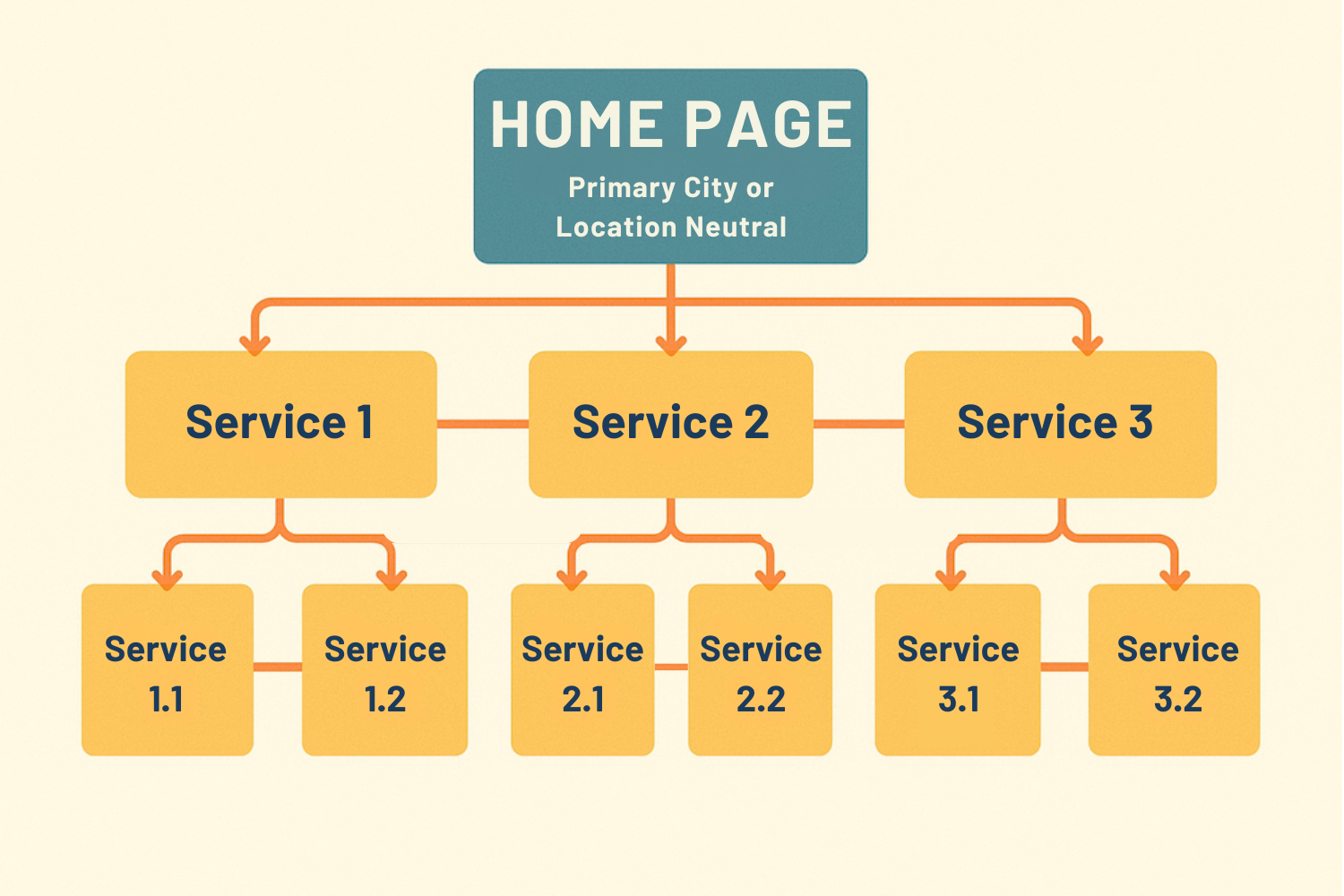
The top level links can be city specific, or location neutral, which we’ll get into in just a second.
Here’s what’s happening:
- Top level links down to the second level.
- Second level pages all link to each other—and back up to the top level (not pictured).
- Third level pages all link to each other, but only within the same silo or category, and also link back up to the specific second level page above them.
This keeps all of the silos separate. Third level pages in this example under “Service 1” are not linking to pages from “Service 2.” Which makes it easier to manage internal linking.
This type of pages structure also makes it obvious to Google which pages are more important. In most cases, the highest level pages have the most search volume (for example “plumbers in boise”). That means, you’re not only showing Google what’s important, but you’re also putting your best keywords at the forefront of your website.
Local SEO Silo Example
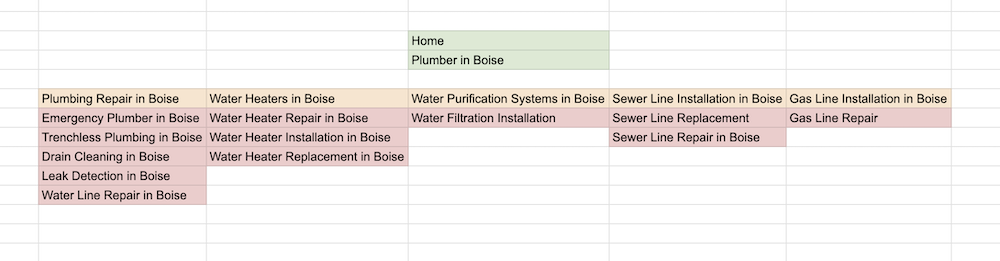
Here is an example of local SEO in Boise, Idaho, and the associated silo for this plumbing business.
In this silo structure, the home page is being used to target a city keyword, “Plumber in Boise” with Service 1 as “Water Heater Services in Boise” and multiple city-service landing pages below it “Water Heater Repair in Boise” – “Water Heater Installation in Boise” – etc.
There is no limit to how many pages you can have, but keeping the total services in the lowest tier around 5-8 pages maximum is probably a good idea.
There are five total silos here, with the primary services being:
- Plumbing Repair
- Water Heaters
- Water Purification
- Sewer Lines
- Gas Lines
I am using the home page for my primary city, which is why “Plumbing Repair” is used as the top level for the services section. I don’t want to have two pages that are targeting plumbing services.
Also, this top level silo could be location neutral—if that worked better for my business and customers.
Either way, this structure organizes everything for you, your customers, and makes it much easier to target all the keyword searches from your local SEO research—and makes internal linking while putting your most important terms at the top.
Creating Your Website Silo Plan
Now that you understand what silos are, and how to group pages together, let’s look at the entire website as a whole.
Everything should be silo’d, regardless.
But different size sites reflect the size of the companies they support. Some companies are local with one or a few locations.
Others are national, with many locations serving many different customer needs.
That’s fine! If you can plan your site well, more pages just means more silos.
Home Page — Target a City Keyword or Location Neutral?
What’s the difference then between a large mega-corporation and a local business with a few locations?
Nothing—except this one small change.
See, your primary pages (home page, service pages) are your strongest pages when it comes to ranking for keywords.
But you also don’t want to be off-putting to potential customers.
That means, at the top level, larger companies with many locations will have a silo that is location neutral. A national plumber, then, would have top level services that were simply “plumbing services”, “water heater services”, “water purification services”, etc. etc.
Personally, I am going to target a specific with my home page until I absolutely cannot do it anymore without losing customers—because the home page is so powerful.
Smaller companies with one, or only a few locations, especially all in the same state of same area, should definitely consider targeting the most important city location with their home page and service pages.
Secondary City Silos
Now, you can place as many city silos on your website as you want.
I base this all on the terms discovered during the previous keyword research phase—if there is search volume then I want to target it.
Each city you service should have it’s own silo, like this one here…
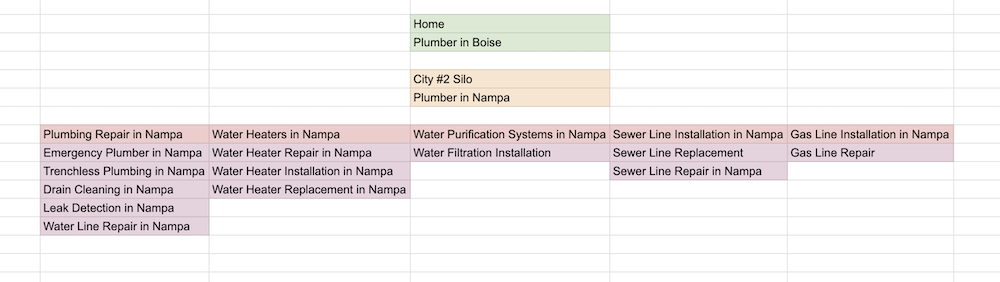
It doesn’t matter if you service one city with one location, or 100s—the only goal is to target every search a potential customer would use.
If the silo is doing that properly, then your website is in a good spot to rank well and help you get traffic, leads, and sales.
Maximizing Your Website Plan
Your silo is the core of a good website plan, but there are important strategies and actions that make this structure even more powerful.
Let’s look at these.
Website Slugs
The slugs you use on your website matter. “Slug” is simply a term to describe the customizable portion of a page’s specific URL address.
Example: If your domain is “johnsplumbing.com”, and you’re working on a page targeting the keyword “plumbers boise”, you will want to create a slug for the page that matches up with the target keyword.
There are many ways to do this, and most website management tools will allow you to customize this URL page slug.
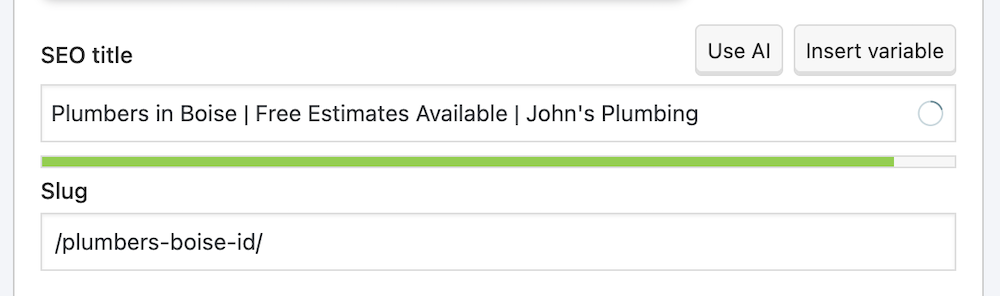
In this example then, the page URL address would be:
johnsplumbing.com/plumbers-boise-id/
Or you may be using a parent-child structure, which could include “services” as a prefix for these pages, for example:
johnsplumbing.com/services/plumbers-boise-id/
What matters is that, for local SEO, having your target keywords in the URL—with the exact target search if possible—will strengthen your ability to rank for those keywords.
*Quick note: It’s always best practice to include the state identifier in the URL slug, in this case Idaho = ID. Many cities with the same name exist in multiple states—making the state identifier a good idea to add to your slugs to avoid confusion for customers and Google.
Internal Linking
Internal linking is very important for SEO and silos as well.
Here’s a few ways to make internal links more effective.
- In Text Links —Internal links in the body of the page, that are in visible text areas (not accordions or other hidden style features), are the most effective.
- Vary Anchor Text — The more variety you give internal links, the more Google understands about your pages. Instead of using “plumbing repair” for all your internal links to that page, vary the anchor text (“get my plumbing repaired” – “professional plumbing repair” – “plumbing repair near me”). This will help you rank for more keyword variations used by potential customers.
- Vary Home Page Anchors — Many SEOs vary anchor text to pages, but not to the home page. But if you’re home page is being used to rank, you should vary the anchor text to your home page as well.
- Watch Out for Orphan Pages — An orphan page is a page on your website that doesn’t have any internal links pointing to it. This makes it difficult for customers to find, and for you to rank on Google. Make sure all of your pages have multiple internal links pointing to them, to improve their ability to rank well.
Also, include a top level menu for the primary pages of the site. Whatever your top level silo services are. That way, your most important pages are always getting links and building authority.
And I always include a link to the home page in the text as well.
Secondary Pages
Lastly, don’t let a good page go to waste. Your secondary pages can be great keyword targets.
Here are some simple tweaks that you can do easily:
- Use your about us page to rank for a specific keyword with a title like “About Our Boise Plumbing Contractors”
- Make a reviews page that targets a keyword, for example “Dallas Plumber Reviews”
- Many people search for “free estimate” as a variable, so use your scheduling page to target this, like “Dallas Plumbers — Free Estimate”
- Lastly, your warranty page often has potential for search targeting, with a title like “Dallas Plumber Warranty”.
Don’t waste a good opportunity to target searches with pages you already need to create.
A Website Plan That Enhances Your Local SEO
With this, you should have everything you need to create a website structure that works well for your local business on Google Maps, Search, and AI/LLM search tools.
This is very effective, and we use it all the time, even here on this specific Brightbeam SEO website.
Creating a strong plan, and keeping your site organized, is worth it when you start seeing the results.
Now, let’s move onto our last important planning task in our local SEO guide.
Maximizing your local SEO plan with thorough competitor analysis.