


Changing the name, address, or even phone number on your Google Business Profile (GBP — Google My Business — GMB —Whatever you want to call it!) can be a headache that leads to a suspension.
Do this the wrong way, and you’re gonna have a bad time.
But, with a little planning and patience, you can improve your chances of getting your business updated without any issues—and get back to doing what matters.
Let me show you a more effective process, and a few tips and tricks, to changing your name, address, and phone number—or NAP—information on your Google Maps listing.
#1 Rule — Never Tinker With Your GBP!
Before getting too deep into this, let me just give you the number one rule for GBP.
Never, ever, tinker with your NAP.
Too often business owners don’t know this. They go into their name and add LLC one week, take it off the next week, change a word the next week—and then all the sudden, out of nowhere, they get suspended and they don’t know why.
Well the reason is, too many people—admittedly SEOs like me lol—change business names to get an edge over the competition. That’s because Google favors businesses with keywords in them.
So if you are in landscaping—then having “landscaping” in your name may help you rank higher for landscaping related services.
Because of this, Google doesn’t want you changing your name all the time. Their guidelines say you should use the name of your business, exactly as it is, and leave it that way.
With that, don’t tinker! Leave your NAP alone.
But if you absolutely must change it, then have a really strong plan, know exactly what you’re changing and why, and then follow the rest of this guide.
And you don’t want to do this more than once if you have to. That’s why I stress having a plan! If you’re plan is to add keywords to your name, then do it right. It’s a good idea! But should not be done carelessly.
Ok, now you want to change your NAP and you have a plan. Well then, let’s get into the steps now shall we?!
Preparation
First step is always preparation, and in this case it’s no different.
You want and need to be prepared in case you DO get suspended—which in reality can always happen at any time.
Here is what you need to have—with each of these matching your exact business name and address:
- Business LLC Documents
- Business DBA Documents (If Necessary—Licensed Under the Above LLC)
- Utility Bills
- Internet Bills
- Exterior Signage On Building
- Address Number & Suite Number Openly Displayed
With this proof, you’re in a strong position to change your NAP and deal with any negative consequences.
One caveat, IF this is not your primary business location, then you may have DBA or licensing information that doesn’t match. This is ok so long as the information matches up to your primary address location, and that location is on Google already.
Now that you’re prepared, let’s look at how to change this NAP information.
Sending Signals with Citations
Before actually changing this information on your Google Business Profile, you can significantly improve your chances of a seamless experience by first updating your business directory citations.
There are seven primary citations that you should attempt to update.
These are:
- Yelp
- Facebook Page
- LinkedIn Business Page
- Nextdoor
- Apple Maps
- Bing Maps
- BBB
Some of these are easier than others to change. But, if you can successfully change three or more, you’ll be in a good spot.
See, Google reviews these sites very often. So, if it sees that the information on these websites has changed, and doesn’t match your GBP, it sends a signal that this information may change to the new information listed on these directory websites.
I usually do this 1-2 weeks in advance to make sure Google has a chance to see these changes and take note of it.
Now, you have significantly increased the chances that your changes go through without a problem. But, there is yet another addition to this strategy to protect your business even further.
“Suggest an edit”
Google wants to give users the ability to help keep Maps up-to-date with accurate information.
That’s why, within Google Maps, there is a “Suggest and edit” feature—allowing users to give feedback about changes that should be made.
Combine this with the powerful signals from the citation changes, and you’re in a good spot to get what you need done the right way.
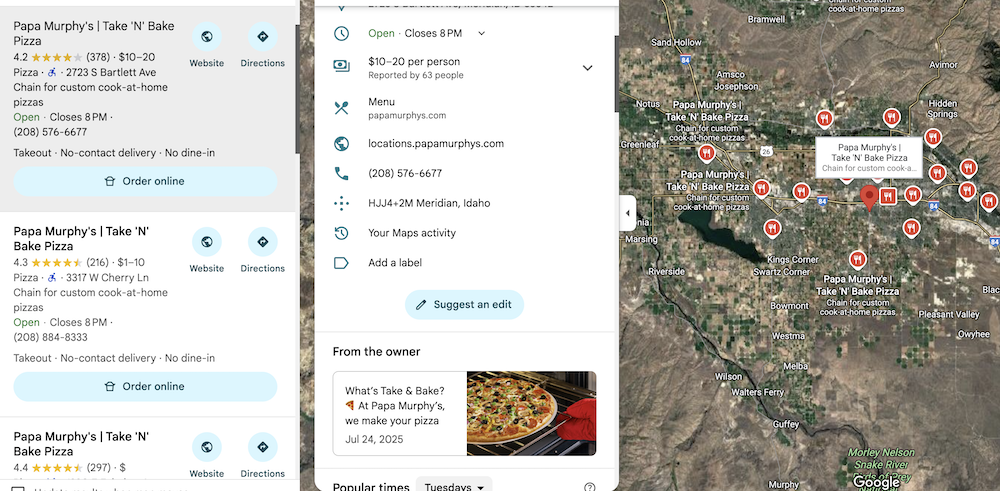
Remember we said you don’t want to make changes to your information in your GBP? Well, this bypasses that.
Because now, instead of you making the change, an outside user is “suggesting” that change. It’s not you, it’s someone else. And you can’t be penalized for what someone else suggests right?
What you need to do is the following:
- Access a Gmail or Gsuite email address
- Higher level local guide accounts work better
- Account must not be associated as an owner or manager of the GBP
- Visit maps.google.com
- Locate your business listing
- Find the “suggest an edit” button
Now, choose the information you would like to change. Put in the new information, and click “submit.”
You can see the edits you have made on your Google Maps profile.
- Simply go to the menu in the top corner.
- Then “Your Contributions”
- “Edits”
You can see the information there.
There are three status labels:
- Accepted
- Pending
- Not Accepted
Typically, if the change is going to go through, it won’t take more than five minutes.
It’s typically quick—either accepted or not accepted.
But, in some cases it will stay on pending. If this happens, it’s pretty much not going to be accepted.
So, if it’s not accepted within a few minutes, it’s probably not going to happen this way.
If find if I have done the preparation, and then suggested the edit, about 90% of the time it gets accepted.
But what about the other 10%?
Changing NAP in the GBP
Now, if you have done the citations signals, and suggested the edit, and it doesn’t go through…then what?
Well, that depends on how much you need the change to happen.
Anytime you change NAP information directly in the GBP you are rolling the dice.
But as long as you understand that, sometimes, things must be done.
Phone Number
This is the simplest of the changes.
I have never had a profile get suspended from a phone number change. Doesn’t mean it can’t happen, but I think of all of theses, it’s the least important to Google.
I mean it’s your phone number, right?
Address
This may actually be the most difficult and biggest red flag.
However, there is a caveat.
Changing States
First of all, if you’re changing states, you’re putting yourself at risk.
Google doesn’t like this behavior because, in this case, you’re basically starting a new business location. It’s not the same community, so it sees these reviews as “ineligible.”
So if you are moving states, and trying to move your GBP, just understand it may not work out. If you don’t have a choice, and your GBP has no other use—then it’s worth a shot.
But if you have any reason to keep the current GBP in your current area, then I suggest starting a fresh one in the new location.
Video Verification
Now, if you’re simply moving down the road, or going from a service-area business to a physical location, the process may be a little easier than you expect.
In most cases changing your address will result in a reverification trigger, NOT a suspension.
That means, the profile goes back to verification mode, and you’ll need to video verify the new location.
This is much easier to deal with than a suspension. But you need to be prepared with everything documented, etc. to get your GBP verified properly without problems—and as quickly as possible.
Business Name
The business name is the trickiest, since triggering suspension is always a possibility.
However, if you have changed your citations and have all the necessary paperwork—and the suggest edit didn’t work—then, well, take a deep breath and make the change directly in the GBP.
Hope for the best, prepare for the worst!
I find, that if I have done all the above steps, and I haven’t been making constant changes to the business name over the last few weeks or months—the change is likely to go through.
Google is likely anticipating these changes anyways from the citation signals you have already sent.
But, there is always, always a chance you have to go through suspension. That’s just part of the game.
Now You Wait!
That’s pretty much it! But let me add one more really important piece of advice.
Once you make a big change to the GBP leave it alone.
Get a few reviews, that’s fine, but don’t make any changes, and avoid any activities in the GBP for 2-4 weeks.
It’s like wet cement, you need to give it some time to dry and let the new profile information settle in.
But, once you have given it the proper time, you should be good to go!
New information, a strong GBP, and no more stress—ready to rank your business higher and get more customers.